


Replace In House On Call Pay, Save 70% for US Home Care Owners


Yes, an outsourced on-call command center, often called a Command Center Pod, can replace in-house on-call pay for most home care agencies while improving after-hours coverage. Instead of paying a coordinator a standby premium to sit by the phone at 2 AM, agencies contract a trained team that answers every call, fills the shift, and documents the outcome. The BOSS System’s own client data shows agencies paying significantly less than the fully loaded cost of an in-house coordinator for this coverage.
TL;DR:
Outsourcing after-hours call coverage with a command center Pod can reduce costs by approximately 70% compared to in-house coordinators, including salaries and benefits.
Proper integration with scheduling systems and clear escalation protocols are critical for ensuring shifts are filled and calls are handled effectively during the pilot phase.
Implementing a combination of AI voice technology and human intake can almost eliminate voicemail loss and increase assessment bookings within the first week.
Removing in-house standby duties improves staff retention and reduces burnout, leading to fewer missed inquiries and better family satisfaction.
A well-managed outsourced setup typically takes weeks to deploy and requires upfront planning on escalation rules, training, and system connections for successful implementation.
Table of Contents
What Does On-Call Pay Home Care Coverage Look Like When You Outsource It?
An outsourced on-call command center replaces the coordinator who used to carry the after-hours phone. Instead of one person absorbing every 2 AM call-off, a Pod, a small trained team with a lead and built-in backup, answers around the clock: nights, weekends, and holidays, with no gaps for vacation or illness.
The calls a Pod typically manages fall into a few buckets:
Caregiver call-offs and shift coverage requests
Family and prospective client inquiries after business hours
Basic intake questions that route into your sales pipeline
Clinical concerns that need triage and escalation to a nurse or the owner
The escalation line matters most. A well-run Pod handles routine call-offs and family questions without ever waking you up. It escalates only for genuine emergencies, a fall, a medication issue, a caregiver who can’t be reached and no backup is available. Everything else gets documented and handled on the spot.
Many outsourced setups now pair an AI voice layer with live human intake so no call goes to voicemail, then hand off to a trained person for anything beyond a scripted answer. Staffingly’s research found that this combination stops after-hours voicemail loss almost immediately and converts evening and weekend inquiries into booked assessments within the first week. Integration with your scheduling platform or EMR determines how fast a filled shift actually shows up on tomorrow’s roster, so ask any provider how their intake connects to your existing software before you sign anything.
Documentation and compliance aren’t optional extras. A legitimate command center logs every call, keeps HIPAA-compliant records, and maintains backup staffing so coverage never depends on one person showing up for their shift.

What Operational Benefits Come From Outsourcing After-Hours Calls?
The dollar savings get attention, but the operational upside is often what actually changes an agency’s trajectory. Missed after-hours calls don’t just annoy families, they cost placements. Staffingly’s analysis of after-hours inquiries found that calls going to voicemail during evenings and weekends routinely turn into lost referrals, because a family calling about a parent who just fell rarely waits until 9 AM Monday to try again.
A staffing gap with real revenue impact: the Activated Insights 2025 Benchmarking Report found that 39% of home care providers had to turn away cases in 2024 purely because they lacked coverage to accept them. Fixing fill rates, not adding caregivers, closes a meaningful part of that gap.
Retention tells a similar story. HomeCareMag’s reporting on shift-planning problems links internal on-call scheduling directly to higher absenteeism and turnover, since standby duty rarely counts as real rest for the coordinator carrying the phone. Remove that expectation entirely and the burnout curve flattens.
The productivity numbers back this up too. Arya Health’s data on automated scheduling agents shows roughly a 25% improvement in scheduler productivity when routine callout handling gets automated and paired with live coverage, freeing your staff to work on placements and relationships instead of chasing replacement caregivers at midnight.
For owners, the quieter benefit is the one that matters most day to day:
No more phone on the nightstand deciding whether tonight is a normal night
A documented call history instead of a coordinator’s memory of what happened
Cleaner morning handoffs because every overnight decision is already logged
How Outsourcing Changes the Math on Coverage Costs
In-house on-call coverage carries more line items than most owners tally up front. Base pay and on-call premiums are just the start; add payroll taxes, benefits, overtime when a call runs long, equipment, training time, and the recruiting cost every time that coordinator burns out and quits.
Outsourced pricing runs differently. Providers typically charge per Pod, per coverage hour, or a flat weekly fee, which converts a fixed payroll obligation into a variable operating expense you can scale up or down. Callnovo’s comparison of outsourced versus in-house call coverage notes that outsourced pricing typically bundles training, technology, and 24/7 staffing into one line, so you aren’t separately funding a phone system, a scheduling platform, and a backup plan.
Here’s a rough framework for running your own comparison:
Total your fully loaded in-house cost: salary, on-call premium, payroll taxes, benefits, and average overtime.
Add hidden costs: recruiting and retraining every time a burned-out coordinator leaves, plus any shift-fill failures that cost you a client.
Compare that total against a Pod’s flat or per-hour fee.
Layer in The BOSS System’s brand-reported figure, a coordinator through BOSS runs about 70% less than the same hire in-house, as one data point, then run your own agency’s numbers against it rather than assuming it applies exactly to your payroll.
Before signing, review the contract for minimums, backup staffing guarantees if a team member is out, onboarding fees, and explicit HIPAA and confidentiality language.
Pro Tip: Ask any provider what happens if your primary point of contact on their team is sick or on vacation. A single-person answer is a red flag; a team-with-backup answer is what you want.
How Do You Pilot and Roll Out Outsourced On-Call Coverage?
Switching from in-house to outsourced coverage works best as a measured pilot, not a hard cutover. Here’s a practical sequence:
Baseline your call volume. Track how many after-hours calls you get weekly and sort them into call-offs, family inquiries, and clinical concerns.
Map your escalation rules. Decide exactly what wakes you up versus what a trained team should handle independently.
Set a pilot window. Thirty to sixty days is usually enough to see real patterns without overcommitting.
Define your KPIs upfront: answer rate, shift-fill rate, and escalation rate are the three that matter most.
Integrate your systems. Connect call routing to your scheduling software or EMR and agree on documentation templates before day one.
Train and test. Build scripts, confirm HIPAA training is in place, and confirm a backup staffing plan exists on their end.
Review monthly. Compare pilot KPIs against your baseline and against the SLA terms in your contract.
Vendor data on rapid deployment suggests providers pairing AI-first intake with human verification can go live within one to two weeks, so a slow rollout is often a sign of friction, not thoroughness. Set a clear rollout decision point: if fill rate and answer rate both beat your in-house baseline for two consecutive months, move to full coverage.
Watch for these common stumbling blocks during setup:
No documented escalation map, so everything gets forwarded to the owner anyway
Weak EMR or scheduling integration, so filled shifts don’t show up where your staff can see them
Vague wake-thresholds, leaving the Pod guessing about what counts as urgent
What I’ve Learned Running an Agency Through This Transition
Most owners overestimate how hard this transition is and underestimate how much they’ve normalized bad sleep. The mistake I see most often isn’t picking the wrong provider, it’s skipping the escalation map entirely and assuming the team will “figure it out.” They won’t, and they shouldn’t have to guess at 3 AM whether a call warrants waking you.
The early wins tend to show up fast: fewer missed inquiries in week one, calmer families because someone always answers, and a noticeable drop in unnecessary owner wakeups by week three or four. The research on caregiver burnout tied to on-call demands lines up with what I’ve seen firsthand running an agency: removing standby duty from your team’s plate does more for retention than almost any raise.
— Ian Dwight Abejo
Get Your Command Center Pod Running in Weeks, Not Months
The BOSS System’s Command Center Pod gives you a trained team answering your phones 24/7, filling shifts when a caregiver calls off, and documenting every conversation so nothing falls through the cracks. You only get woken up for a true emergency, not a routine scheduling question at midnight.
That coverage comes at roughly 70% less than the fully loaded cost of an in-house coordinator, once you account for salary, payroll taxes, and benefits.* It’s a team with a leader and built-in backup, so coverage never rests on one person showing up for their shift. Onboarding typically includes mapping your escalation rules, connecting to your scheduling software, and a reporting cadence so you can see fill rates and answer rates from week one.
If you’re ready to see what a pilot looks like for your agency, request a pilot through the on-call program or explore the full Command Center offering to review coverage details and next steps.
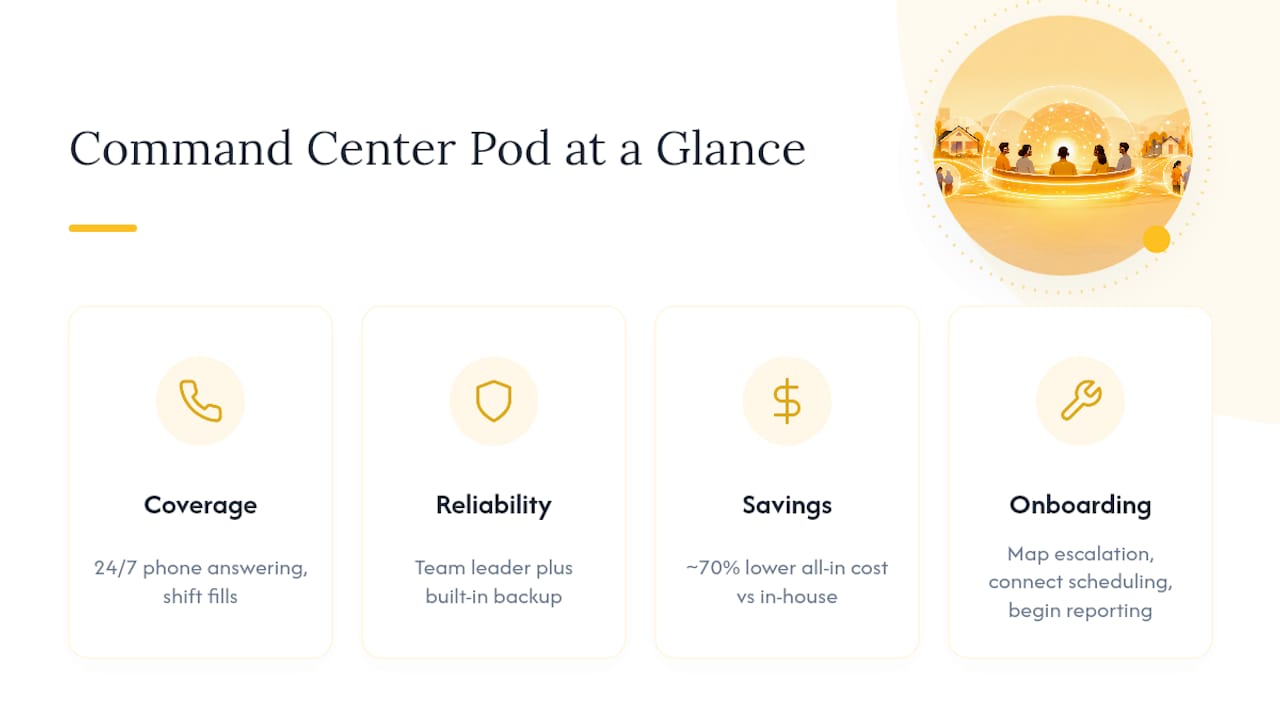
*Compared to the average all-in cost of an in-house coordinator, including salary, payroll taxes, benefits, and admin costs. Sources: Indeed, IRS, Bureau of Labor Statistics.
Sources
Recommended


Comments