


How to Get Medicaid Billing Right the First Time
- Alyana Cabayao
- 6 hours ago
- 10 min read


To get a Medicaid claim paid, enroll correctly with your state program, verify eligibility before every visit, submit a clean electronic claim through EDI 837 or your state’s Direct Data Entry portal with accurate codes and modifiers, then monitor remittance advice and fix denials before your filing window closes. That’s the whole game in one sentence, but each step has traps that cost practices real money.
The hard numbers matter here. Federal rule requires you to submit within 12 months of the date of service, and states must pay 90% of clean practitioner claims within 30 days, 99% within 90 days. Miss the filing window and the claim is often gone for good, no appeal available.
Before you submit anything, run through this:
Confirm the patient’s Medicaid or MCO eligibility on the date of service, not last week.
Match your NPI, taxonomy, and rendering provider fields to what’s on file with the payer.
Scrub for NCCI code-pair conflicts and unit-of-service limits before transmission.
Choose EDI 837 or your state’s DDE portal, not paper, unless your state explicitly requires it.
Track remittance advice weekly and act on denials inside your filing window, not at month’s end.
Key Takeaways
Clean Medicaid claims require correct enrollment, verified eligibility, accurate NCCI-compliant coding, and prompt denial remediation inside the 12-month filing window.
Point | Details |
Enroll and credential separately | Complete state MMIS enrollment and MCO credentialing individually, since one doesn’t cover the other. |
Verify eligibility every visit | Use 270/271 transactions at scheduling, check-in, and before billing multi-visit care. |
Submit electronically first | Use EDI 837 or state DDE portals over paper forms to reduce processing delays and rejections. |
Screen for NCCI edits pre-submission | Scrub for PTP conflicts and MUE unit limits before transmitting any claim. |
Outsource billing to stay ahead of denials | The BOSS System’s billing and A/R specialists handle claims and denial remediation at significantly lower cost than an in-house hire. |
Table of Contents
What Is the Medicaid Billing Process for Provider Enrollment?
What Forms and Formats Does Medicaid Claims Submission Require?
How Does Billing Differ Between Fee-for-Service and Managed Care?
What’s the Right Way to Handle Medicaid Denials and Appeals?
Where Can You Find Authoritative Medicaid Billing Rules for Your State?
What Providers Underestimate About Medicaid Billing Complexity
How The BOSS System Handles Medicaid Billing for Home Care Agencies
What Is the Medicaid Billing Process for Provider Enrollment?
You can’t bill Medicaid without enrolling in the program first, and this step trips up more new practices than any coding error ever will. Enrollment happens through your state’s Medicaid Management Information System (MMIS) portal, and it typically requires your National Provider Identifier (NPI), a completed W-9, current license documentation, and a taxonomy code that accurately describes your specialty.
The process usually runs like this:
Register on your state Medicaid provider portal and create your account credentials.
Enter your NPI, along with your Type 1 (individual) and, if applicable, Type 2 (organizational) numbers.
Select the correct taxonomy code for your specialty. This single field causes a disproportionate share of enrollment denials.
Upload your W-9, licensure, and any required accreditation documents.
Wait out the processing window, which varies by state and can run anywhere from a few weeks to a couple of months.
Here’s the part providers often miss: state enrollment and MCO credentialing are two separate processes. You can be fully enrolled with your state Medicaid program and still get denied by a managed care organization because you never completed their separate credentialing application. If you serve managed-care members, budget time for both tracks. Common pitfalls include mismatched taxonomies between your state enrollment and MCO file, missing group NPI linkages, and practice locations that were never added to your enrollment record.
How Do You Verify Medicaid Eligibility Before a Visit?
Eligibility changes month to month, sometimes week to week, which makes “verify once and forget it” the single most expensive habit in Medicaid billing. Use the 270/271 eligibility transaction format through your clearinghouse or your state’s provider portal to confirm active coverage before you ever schedule a service.
Beyond a basic eligibility check, confirm the patient’s assigned MCO and primary care provider designation, since services delivered outside that assignment can deny even when the patient is technically covered. Document the verification, including the date and the response you received, directly in the chart. That snapshot becomes your evidence if a payer later disputes eligibility during an audit.
Verify at scheduling to catch coverage gaps early.
Verify again at check-in, since eligibility can shift between the two.
Re-verify before billing for any multi-visit episode of care or recurring service.
Pro Tip: Save a screenshot or portal confirmation number alongside your eligibility check. A verbal “yes, they’re covered” from a phone rep won’t hold up if the claim gets audited six months later.
What Forms and Formats Does Medicaid Claims Submission Require?
Most Medicaid claims move through the ANSI X12 837 electronic claim standard, the same backbone used across commercial payers, split into 837P for professional services and 837I for institutional claims. Paper equivalents still exist. The CMS-1500 form covers professional claims and the UB-04 covers institutional billing, but most state programs now treat paper as the exception, not the default, reserved for rare cases like retroactive eligibility or specific exception categories your state manual will spell out.
Direct Data Entry, or DDE, gives you a portal-based alternative to full EDI submission. It’s especially useful for adjustments, Medicare crossover claims, and exception claims that don’t fit cleanly into a batch 837 file. Most state portals require a separate DDE registration on top of your basic provider enrollment, so set that up early rather than discovering the gap when you need to correct a claim urgently.
A few field-level habits prevent a surprising share of rejections:
Cross-check your NPI against the payer’s file. A mismatch between your billing NPI and rendering NPI is a common, entirely avoidable denial trigger.
Confirm your taxonomy code matches what’s on file for that specific service location, not just your general enrollment record.
Distinguish billing provider from rendering provider fields correctly. Group practices frequently mix these up when a claim involves a supervising physician.
Sequence diagnosis codes properly, with the primary diagnosis first, since order affects how automated systems adjudicate the claim.
State-level companion guides, like Indiana’s IHCP claim submission module, walk through these fields line by line and are worth bookmarking for your specific state.
How Do Medicaid NCCI Edits and MUEs Cause Denials?
Automated edits reject a huge share of Medicaid claims before a human ever looks at them, and understanding how they work is the fastest way to stop feeding them bad data. The 2026 Medicaid NCCI Technical Guidance Manual lays out two core mechanisms: Procedure-to-Procedure (PTP) edits, which block certain code pairs from being billed together on the same date of service, and Medically Unlikely Edits (MUEs), which cap the number of units allowed for a given code per patient per day.
States layer their own edits on top of the federal NCCI framework, which means a code pair that clears in one state can still deny in another. Modifiers like 59 or the X{EPSU} series can bypass certain PTP edits when the services are clinically distinct, but using them without proper documentation invites an audit rather than a payment.
Pro Tip: Don’t treat a modifier as a workaround. Every override modifier should be backed by chart documentation that justifies why the two procedures were genuinely separate.
Before you transmit anything, run these checks:
Screen for known PTP code-pair conflicts using your clearinghouse’s scrubber or an internal audit tool.
Validate units billed against MUE limits for each CPT or HCPCS code.
Cross-reference state-specific edit lists, since CMS requires states to update Medicaid NCCI files quarterly.
Flag any modifier use for a second review before submission, not after denial.
How Does Billing Differ Between Fee-for-Service and Managed Care?
Fee-for-service and managed care Medicaid run on genuinely different rails, and treating them the same is where a lot of avoidable denials start. Under FFS, the state pays providers directly through the state’s fiscal agent, using the state fee schedule and the standard timely-filing and payment timelines set by federal rule. Under managed care, the state instead pays a capitated rate to a Managed Care Organization (MCO), and the MCO pays you according to its own contracted terms.
That distinction changes your entire workflow:
Fee-for-service: Submit directly to the state MMIS or fiscal agent, confirm the applicable fee schedule, and set up electronic funds transfer to match your state’s EFT requirements.
Managed care: Credential separately with each MCO you serve, follow that MCO’s specific submission portal and prior authorization rules, and understand that some services are reported as encounter data rather than paid claims.
Dual eligibility: When a patient has both Medicare and Medicaid, Medicare typically pays first and the claim crosses over automatically to Medicaid for secondary payment. Some states require manual crossover submission when the automatic process fails, so confirm your state’s specific handling before assuming it’s automatic.
Authorization rules also diverge sharply. An MCO might require prior authorization for a service that FFS Medicaid pays without one, so verify authorization requirements per payer, not per service alone.
What’s the Right Way to Handle Medicaid Denials and Appeals?
Every denial starts with reading the remittance advice correctly, and most billers skim past the details that actually matter. Locate the Internal Control Number (ICN) for the claim, then identify the specific denial reason code. That code tells you whether you’re dealing with a simple data error or something that requires supporting documentation.
From there, follow this sequence:
Classify the denial. A wrong modifier or mismatched NPI usually needs a straightforward correction. A medical necessity denial needs documentation.
Choose the correction path carefully. If the claim already processed, submit an adjustment or void through your state’s DDE system rather than resubmitting as a brand-new claim. Resubmitting instead of adjusting is one of the most common causes of duplicate-claim denials, and it creates messy accounts-receivable reconciliation down the line.
Build your appeal packet. Include the original claim, the remittance advice, and any chart documentation that supports medical necessity or clinical distinctness for NCCI overrides.
Track your appeal deadline. States set their own appeal windows, often 30 to 60 days from the denial date, separate from the original 12-month filing rule.
Request manual medical review when an NCCI or MUE edit denied a claim you believe was clinically justified. This requires strong documentation but can recover otherwise lost revenue.
Pro Tip: Keep a denial log sorted by reason code, not just by claim number. Patterns jump out fast once you see the same code repeating across a payer or provider.
Where Can You Find Authoritative Medicaid Billing Rules for Your State?
Start at your state Medicaid agency’s website, then navigate to the provider section, then the billing manual or fiscal-agent companion guide. That’s where the real, binding detail lives, not in generic online guides. Medicaid confirms what providers learn the hard way: Medicaid is administered state by state, with its own manuals, fee schedules, and fiscal agents.
Subscribe to your state’s provider bulletin list and track quarterly NCCI file updates, since edits change on a rolling basis. A manual like Virginia DMAS’s Practitioner Chapter V shows what to expect: DDE instructions, accepted claim forms, and taxonomy guidance specific to that state.
Bookmark your state’s MMIS provider portal and billing manual.
Sign up for provider bulletins and payer newsletters.
Check for quarterly NCCI and fee schedule updates.
What Daily Habits Prevent Most Medicaid Billing Denials?
The practices with the cleanest Medicaid claim rates aren’t doing anything exotic. They’ve just turned the basics into a repeatable routine instead of an afterthought.
Verify eligibility and confirm prior authorization status before the appointment happens, not after.
Run every claim through a pre-transmission scrubber for NCCI conflicts and unit-of-service limits.
Review your accounts receivable aging report weekly, with a short follow-up window for anything pended more than 7 to 14 days.
Audit recurring denial categories monthly: wrong taxonomy, incorrect place-of-service codes, missing or mismatched modifiers, and unit errors.
Track your clean-claim rate, denial rate by category, and days in AR specifically for Medicaid, separate from your commercial payer metrics.
Pro Tip: If your Medicaid clean-claim rate sits below 90%, look at your taxonomy and place-of-service fields first. Those two errors account for a disproportionate share of avoidable rejections.
Because state MMIS systems vary so widely, a claim workflow that works flawlessly in one state can fail in another purely on formatting differences. Standardizing your internal pre-transmission checklist per state and per MCO cuts down on that rework significantly.
What Providers Underestimate About Medicaid Billing Complexity
Most practices treat Medicaid billing as a smaller version of commercial billing, just with lower reimbursement rates. That’s the wrong mental model, and it’s why so many practices bleed revenue they never notice. Medicaid billing is a compliance discipline first and a revenue function second. The 12-month filing rule, the layered NCCI edits, the state-by-state variation in DDE procedures. None of that behaves like commercial insurance, and applying commercial billing habits to Medicaid claims is where denial rates quietly climb.
The bigger blind spot is staffing. Practices invest heavily in coders and billers who understand CPT and ICD-10 coding but never get dedicated training on Medicaid-specific edit logic or their state’s companion guide. That gap doesn’t show up as a crisis. It shows up as a slow, steady drain of denied claims that get written off instead of appealed, because nobody has the bandwidth to chase them down inside the filing window.
The fix isn’t more general billing staff. It’s staff who specifically understand Medicaid’s rules, backed by a triage process that catches denials before they age past the point of recovery.
How The BOSS System Handles Medicaid Billing for Home Care Agencies
Medicaid billing eats hours your team doesn’t have, especially when denials pile up faster than anyone can work them. The BOSS System’s billing and A/R specialists handle claims scrubbing, denial remediation, and credentialing support specifically for home care agencies, backed by the Command Center for after-hours escalation and documented workflows built around HIPAA compliance.
If you’re evaluating outsourced billing support, ask about service-level agreements, clearinghouse and EHR integration, and whether you can run a trial audit before committing. That savings goes straight to your margin instead of your overhead. See what a dedicated billing Pod looks like for your agency on the services page, or explore The BOSS System directly to find the coverage that fits your claims volume.
Frequently Asked Questions About Medicaid Billing
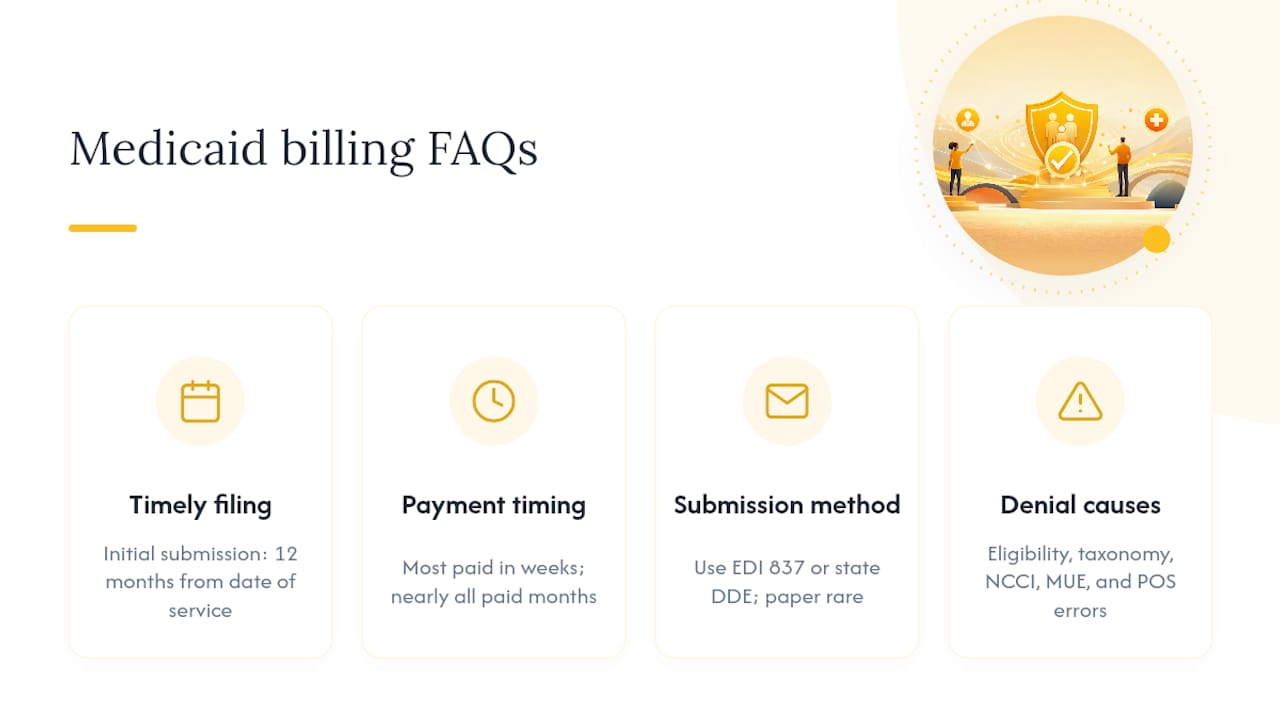
What is the timely filing limit for Medicaid claims? Federal rule sets the initial submission window at 12 months from the date of service. Some states allow shorter windows, so always confirm your specific state’s rule alongside the federal floor.
How long does Medicaid take to pay a clean claim? States must pay a large majority of clean practitioner claims within a few weeks and nearly all within a few months, per 42 CFR § 447.45. Managed care organizations may follow different contracted timelines.
Should I submit Medicaid claims electronically or on paper? Electronic submission through EDI 837 or your state’s DDE portal is the standard path. Most states now treat paper claims as a rare exception, reserved for specific circumstances outlined in your state manual.
What causes most Medicaid claim denials? Common culprits include eligibility mismatches, incorrect taxonomy codes, NCCI code-pair conflicts, unit-of-service errors above MUE limits, and wrong place-of-service codes.
Do I need separate credentialing for Medicaid managed care plans? Yes. State Medicaid enrollment and MCO credentialing are separate processes, and managed care organizations set their own contracted billing workflows apart from state fee-for-service rules.
Sources
Recommended


Comments