


Fix Billing and AR Handoffs That Cost Home Care Agencies Cash


Billing is the act of creating and sending an invoice. Accounts receivable (AR) is everything that happens between that invoice going out and the cash landing in your account, including tracking, collections, and reconciliation. The single highest-leverage fix for most service businesses is invoice accuracy and speed: get the invoice right the first time and send it the moment the service is confirmed, because that is what starts the clock on getting paid.
TL;DR:
Invoices should be sent immediately after service completion to reduce days sales outstanding and accelerate cash flow.
Assign clear ownership to each stage of the AR process, especially follow-up and reconciliation, to prevent delays and errors.
Use automated AR tools with multiple payment methods, machine learning for cash matching, and customer portals to improve accuracy and speed.
Monitor key KPIs weekly or monthly, focusing on DSO, collection effectiveness, and match rates, to catch slow payments early.
In home care, capturing real-time service data before invoicing significantly lowers disputes and speeds up payments.
Table of Contents
What’s the Difference Between Billing and Accounts Receivable?
Billing is one task inside a much bigger job. It is the paperwork step: generating an invoice, formatting it correctly, and getting it to the customer. Accounts receivable is the entire financial relationship that follows, and it stays on your books as an asset until the money actually clears, according to Investopedia’s definition of accounts receivable.
That distinction matters when something goes wrong. A billing problem looks like a wrong rate, a missing service code, or an invoice that never got sent. An AR-process problem looks different: invoices go out fine, but nobody follows up, payments get logged against the wrong account, or a dispute sits unresolved for six weeks. Use this quick filter:
Billing issue: the invoice itself was late, inaccurate, or missing required detail.
AR issue: the invoice was correct, but tracking, collections, or reconciliation broke down afterward.
Both: repeat late payments from the same client, usually a sign the terms or the relationship needs review.
The Accounts Receivable Process: Seven Practical Steps
The AR cycle runs through seven stages, and each one has a typical owner and a typical way it breaks, based on the framework Xero outlines for getting paid faster.
Credit evaluation. Office managers or finance leads set who gets terms and how much exposure is acceptable. Red flag: extending credit without checking payment history.
Payment terms. Sales or account managers agree on net terms upfront. Red flag: verbal agreements never written into the contract.
Invoicing. Billing staff generate and send the invoice. Red flag: invoices batched weekly instead of triggered by service completion.
Payment tracking. AR staff monitor what is outstanding. Red flag: tracking lives in someone’s memory instead of a ledger.
Collections. A designated collector follows a set outreach schedule. Red flag: no follow-up until an invoice is 60 days overdue.
Dispute resolution. Whoever has authority to adjust charges resolves conflicts fast. Red flag: disputes routed through three people before anyone decides anything.
Cash application and reconciliation. Bookkeeping matches incoming payments to open invoices. Red flag: unapplied cash sitting in a suspense account for weeks.
Pro Tip: Assign one named owner to each of these seven steps, even in a small shop. Shared ownership is how invoices fall through the cracks.
Billing Best Practices That Speed Payment and Reduce Disputes
Every invoice should include the client name, service dates, itemized charges, a unique invoice number, payment terms, accepted methods, and remittance instructions. Missing any of these creates a reason for the client to delay payment.
Timing matters as much as content. Invoice the moment a service, milestone, or billing period closes, not on a fixed calendar day that ignores when work actually finished. Xero’s own guidance on the accounts receivable process recommends immediate invoicing paired with a consistent follow-up schedule, and that combination does more to shrink days sales outstanding than almost any other single change.
On payment methods and terms:
Offer at least two payment methods (ACH and card, at minimum) since friction at payment is a common excuse for delay.
Consider a small early-pay discount (1% to 2%) for invoices settled within 10 days.
Apply late fees consistently once terms are established.
Build a staged collections cadence: a reminder at day one past due, a call after some weeks, and escalation after extended overdue periods.
How Automation and Billing Tools Change AR
Automated accounts receivable software removes the manual grind from invoice delivery, payment reminders, and cash application. Businesses that adopt it report meaningfully higher match rates when reconciling incoming payments, with high-performing implementations reaching strong match rates, according to Billtrust’s guide to the AR process.
Before choosing a tool, check it against this feature list:
Multiple payment rails (ACH, card, wallet) built in, not bolted on.
Machine-learning matching for cash application, not just rule-based matching.
A self-service customer portal for viewing and paying invoices.
A clear exception workflow for payments that don’t match automatically.
Automation is not a substitute for process discipline. It amplifies whatever process you already have, and a messy hand-off between service delivery and billing stays messy even with better software behind it. Expect to spend the first few months after implementation watching match rates and exception volume closely rather than assuming the software runs itself.
Which KPIs Actually Show Whether Your AR Is Healthy?
Three numbers tell you more than a bank balance ever will: days sales outstanding, collections effectiveness index, and cash-application match rate.
DSO measures the average number of days it takes to collect payment after a sale. Calculate it as (accounts receivable ÷ total credit sales) × number of days in the period. A rising DSO signals slower collections or looser credit terms creeping in. CEI measures how much of what was actually collectible got collected in a period, and it works alongside DSO because DSO alone can be misleading, per Billtrust’s KPI framework.
Metric | What it tells you | Action trigger |
DSO | Average days to collect | Rising trend over 2+ periods |
CEI | Percentage of collectible cash actually collected | Below a certain threshold |
Cash-application match rate | Percentage of payments auto-matched to invoices | Below a certain threshold |
Aging buckets (60/90) | Where overdue cash is concentrated | Any balance past 90 days |
Review these weekly at the staff level and monthly at the ownership level. Waiting for quarter-end to check DSO is how a slow leak turns into a real cash problem.
Where Billing and AR Actually Break Down in Home Care
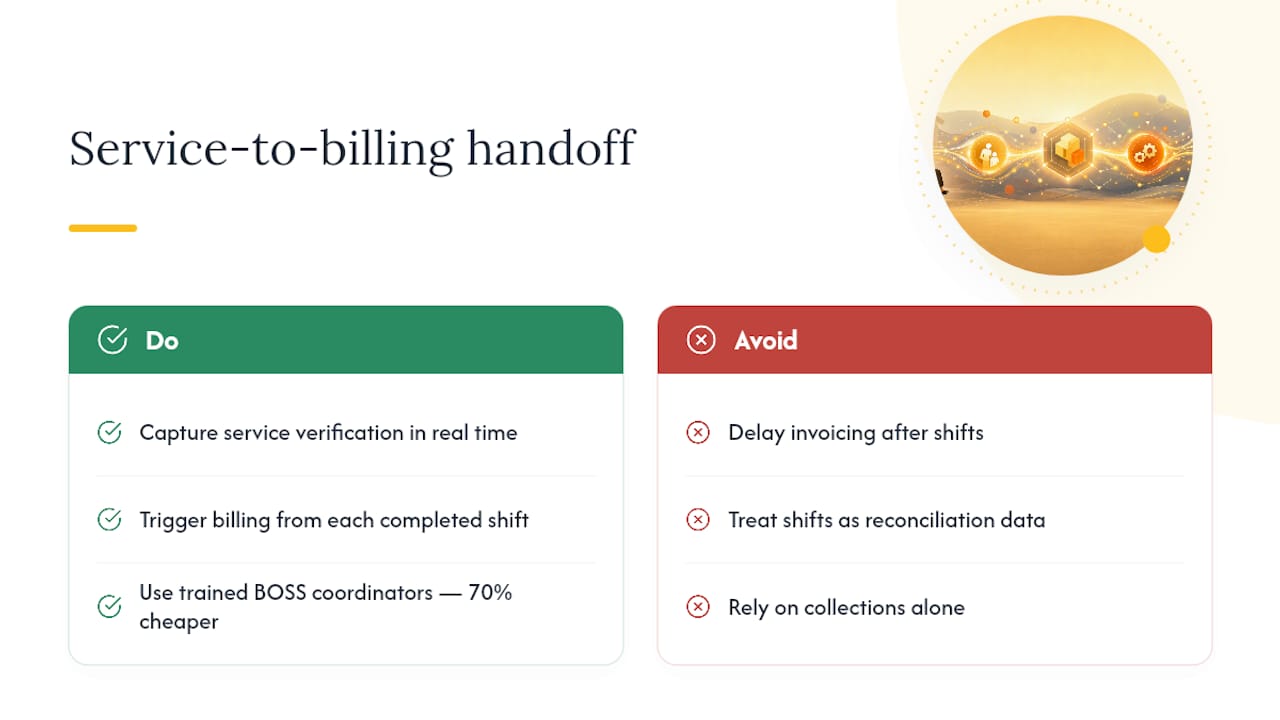
The costliest failure point isn’t collections, it’s the hand-off between service delivery and billing. When a caregiver’s completed visit isn’t captured accurately and passed to billing right away, the invoice either goes out wrong or goes out late, and both invite disputes. Xero’s process research backs this: capturing real-time service verification before invoicing produces fewer disputes and faster payment.
Billing specialists who understand the actual service workflow, not just the accounting software, catch discrepancies before they reach the client. A trained coordinator through The BOSS System costs roughly 70% less than hiring the equivalent role in-house, once payroll taxes, benefits, and equipment are factored in.
Pro Tip: Treat every completed shift as a billing trigger, not a data point to reconcile later. The lag between service and invoice is where revenue quietly disappears.
What Good AR Looks Like for a Small Service Business
Good AR means invoices go out same-day, someone owns collections by name, and match rates get checked weekly, not quarterly. Audit yourself: Who owns each of the seven AR steps? How fast do invoices go out after service? What’s your current match rate? Where do disputes usually start?
— Ian Dwight Abejo
How The BOSS System Keeps Billing and AR From Falling Apart
The gap between a completed caregiver visit and an accurate invoice is exactly where The BOSS System was built to close. Dedicated billing and A/R specialists trained specifically in home care workflows validate charges against real service records, catch errors before invoices go out, and keep collections on schedule instead of letting overdue balances drift past 90 days.
Pair that with the Command Center Pod covering calls 24/7 so no shift change or call-off slips through undocumented, plus bookkeeping support to keep reconciliation clean, and the hand-off failures that usually drive disputes mostly disappear. A trained billing coordinator through a specialized outsourced system can cost significantly less than the same hire in-house, once payroll taxes, benefits, and equipment are counted.
If invoices are going out late, disputes are piling up, or your DSO has crept upward for two straight quarters, get a look at the on-call program and see how a staffed, home-care-specific billing team fits your agency.
Sources
FAQ
What Is AR in Healthcare Billing?
In healthcare and home care billing, AR refers to the money owed for services already delivered, tracked from invoice through payment and reconciliation, distinct from the billing step of simply generating the invoice.
Who Pays Bills, AR or AP?
Neither pays bills directly; accounts payable (AP) is what your business owes to vendors, while accounts receivable (AP’s counterpart) is what customers owe you, and it’s collections activity within AR that pursues payment from customers.
Are AR and Billing the Same Thing?
No. Billing is the single task of creating and sending invoices, while AR covers the full cycle including credit terms, tracking, collections, dispute resolution, and cash application.
Is Invoicing Part of AR?
Yes, invoicing is one of the seven steps in the AR cycle, but it’s only the starting point. The larger AR process continues through payment tracking and reconciliation long after the invoice is sent.
Recommended


Comments