

Fix 2 AM Shift Gaps: Answering Service or On Call for Home Care


For most home care agencies, an answering service handles routine message-taking and after-hours calls affordably, while an on-call program is what you need when calls must trigger real action, like filling a caregiver call-off at 2 AM. A virtual receptionist fits when calls need to end in a booked appointment. The right pick comes down to how often your calls require dispatch or escalation versus simple documentation, a distinction the next sections break down in detail.
TL;DR:
Answering services are suitable for quick message capture and appointment scheduling, but they do not handle active problem-solving or shift coverage.
On-call programs actively work shift replacements and escalate genuine emergencies, making them ideal for caregiver call-offs and urgent after-hours issues.
Implementing a reliable phone support system requires detailed scripting, escalation plans, and real-time testing, with setup times ranging from days to weeks depending on the model.
Costs vary based on service complexity, with basic AI plans starting around $10 per month and premium human-staffed options reaching several hundred dollars, often cheaper than in-house staff once all costs are included.
Agencies must verify vendor claims of HIPAA compliance, detailed reporting, and staffing redundancy, and should run a 30-day pilot to ensure service quality before full deployment.
Table of Contents
Answering Service vs On-Call Service: The Core Differences
The four models sound similar on a sales call but behave very differently once the phone actually rings.
An answering service works as a virtual receptionist. It takes messages, schedules appointments, and escalates urgent matters based on a script you provide. These calls run short. Interactions typically finish quickly, because the operator’s job is to capture information and pass it along, not solve the problem themselves.
An on-call program goes a step further. Instead of just recording a caregiver’s call-off, the team actively works the problem: contacting backup staff, confirming coverage, and only waking the agency owner for a genuine emergency. This is dispatch, not message-taking.
A virtual receptionist overlaps heavily with answering services but leans harder into scheduling software integration, closing the loop by booking the appointment or intake call directly rather than just noting the request.
A call center operates at a different scale entirely. It manages higher call volume across multiple channels and handles longer, more complex conversations, often several minutes for detailed support issues, backed by CRM integration and reporting dashboards. That depth of analytics and CRM integration matters when phone work is your core revenue channel. For most home care agencies, it’s more infrastructure than the call volume justifies.
Here’s how the staffing models typically differ:
Answering services use trained operators following your script, often shared across multiple clients.
On-call programs pair a lead coordinator with backup staff, so coverage never depends on one person.
Virtual receptionists blend scheduling software with live call handling.
Call centers deploy larger teams organized around queues, shifts, and escalation tiers.
Which Model Fits Your Agency’s Daily Reality?
Match the scenario to the model, not the other way around.
After-hours clinical triage and worried family calls. These need a human who can calm a family member and know when to escalate to a nurse or the on-call manager. An on-call program built for HIPAA-compliant, 24/7 live answering with defined escalation protocols is designed for exactly this.
Caregiver call-offs and last-minute shift coverage. This is the single biggest reason home care agencies burn out their office staff. A basic answering service can log the call-off, but only an on-call program actively works the backup list and confirms a replacement caregiver.
New client leads and intake scheduling. Most inbound business calls, roughly 60% to 80% by one industry estimate, are routine scheduling or basic information requests. A virtual receptionist that books directly into your intake calendar outperforms a plain message-taking service here.
Weekend and holiday surges. Call volume doesn’t pause for Thanksgiving. Whatever model you choose needs staffing depth built for the calendar, not just business hours.
Home care agencies specifically lean on features like attendance logging and urgent shift coverage support, which general-purpose answering services rarely build for.
How Do You Set Up an Answering or On-Call Service?
Getting a phone support service to actually work reliably takes more than flipping a switch, and skipping steps here is where most agencies get burned.
A dependable rollout usually follows this sequence:
Draft call scripts covering common scenarios: call-offs, family concerns, new client inquiries, vendor calls.
Build an escalation matrix naming who gets called, in what order, and under what conditions.
Train the vendor’s team on your specific policies, not a generic template.
Run test calls simulating a 2 AM call-off and a family emergency before going live.
Confirm how call summaries and documentation get delivered, ideally in real time, not a batch email the next morning.
Setup speed varies by model. Answering services can often go live in days, while full call center implementations take weeks or months to configure properly. On-call programs sit in between, since the escalation matrix takes real time to get right, but a focused team can typically launch in one to two weeks.
Pro Tip: Run your test calls at odd hours, not during business hours. A service that sounds sharp at 2 PM can fall apart at 2 AM if the overnight team wasn’t part of your training session.
What Drives the Cost of Answering and On-Call Services?
Pricing shapes vary more than most owners expect, and the sticker price rarely tells the whole story.
Common pricing structures include:
Per-minute or per-call billing, common for basic answering services.
Per-seat or per-agent pricing, typical of call centers.
Flat retainer or Pod-based pricing, where a dedicated team covers a defined scope regardless of call volume.
Entry-level AI-blended answering services can run as low as about $10 a month, while premium human-staffed services often land in the several-hundred-dollar range. Features that push pricing higher include HIPAA compliance, real-time escalation, custom scripting, and integration with your scheduling software.
For budgeting purposes, compare the total loaded cost of a coordinator role you might hire in-house, not just the base salary. The Bureau of Labor Statistics frames customer service roles around handling inquiries and processing information, but salary alone ignores payroll taxes, benefits, and equipment. A trained home care coordinator sourced through a dedicated Pod model can run roughly 70% less than the same hire made in-house, once those hidden costs get counted.footnote: Compared to average all-in cost of an in-house coordinator (salary, payroll taxes, benefits, admin costs). Sources: Indeed, IRS, Bureau of Labor Statistics.
What Questions Should You Ask an Answering Service Vendor?
A strong RFP or demo call should pressure-test these areas before you sign anything.
Scope and escalation SLAs. Ask exactly how fast a true emergency call reaches a decision-maker, and get the number in writing.
HIPAA compliance. Don’t assume it. Ask which specific policies, training, and data handling practices back that claim.
Staffing redundancy. Ask what happens if the operator assigned to your account calls off sick. A team-based model with built-in backup answers this better than a single point of contact.
Reporting format. Request a sample call summary before committing, not after.
Contract terms. Watch for long lock-in periods, per-minute overage fees, and vague language around what counts as an “emergency” call.
Run a 30-day pilot before a full rollout. Track missed calls, average escalation time, and caregiver shift-fill rate. Those three numbers will tell you more than any sales deck.
How The BOSS System’s Command Center Solves These Gaps
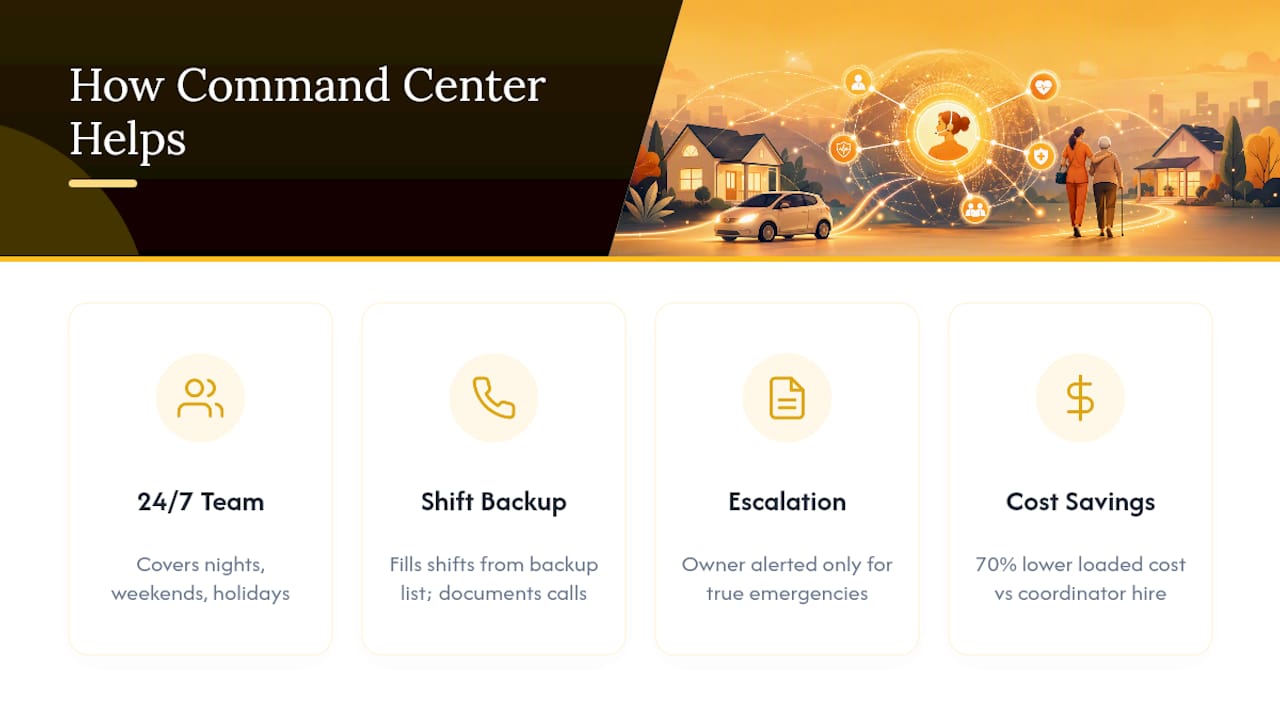
An on-call program model built around the exact gaps described above: a trained team, not a single operator, covering phones 24/7, including nights, weekends, and holidays. When a caregiver calls off at 2 AM, the team works the backup list, fills the shift, and documents the call, only escalating to the owner for genuine emergencies.
That structure maps directly to the vendor checklist above: built-in staffing redundancy, defined escalation rules, and documentation delivered as part of the workflow rather than bolted on. The 70% cost-savings figure reflects the loaded cost comparison against an in-house coordinator hire, informed by industry employment cost data. Agencies evaluating this model can review the on-call program details directly.
What Home Care Owners Get Wrong About Phone Coverage
The biggest mistake isn’t picking the wrong vendor category. It’s skipping the escalation matrix entirely and assuming any answering service will “figure it out.” Vague rules produce inconsistent 2 AM decisions, and inconsistency is what erodes family trust.
The second mistake is assuming HIPAA compliance by default. Verify it in writing every time.
The third is ignoring reporting quality during evaluation, then discovering three months in that call summaries arrive too late to act on. Audit your current vendor against these three points this week, not next quarter.
— Ian Dwight Abejo
Get After-Hours Coverage Built for Home Care
The BOSS System is the alternative to hiring and training an in-house on-call coordinator, at roughly 70% less loaded cost, because the Command Center Pod runs 24/7 without payroll taxes, benefits, or equipment on your books.
Agencies wrestling with caregiver call-offs, family concerns after hours, or a phone that never stops ringing at dinner should consider a pilot. If your current setup handles routine messages fine but falls apart the moment a shift needs backfilling overnight, that’s the specific gap the ON-CALL PROGRAM was built to close. Reach out to see how a Command Center Pod could cover your agency’s phones starting this month.
Sources
Background for this article draws on the Bureau of Labor Statistics occupational data and GoodCall’s answering service versus call center comparison.
FAQ
What Is the Point of an Answering Service?
An answering service exists to make sure calls get answered and documented when your staff can’t pick up, capturing messages, scheduling requests, and urgent alerts so nothing falls through the cracks after hours.
Do Answering Services Still Exist?
Yes, and they’ve expanded rather than shrunk. AI-blended options have pushed entry-level pricing down while human-staffed premium services still dominate for calls involving emotional or clinical complexity.
What Does “Answering Service” Mean When Calling a Business?
It means a trained operator, not the business’s own staff, answered the call following a script the business provided, then relayed or escalated the message according to agreed rules.
How Much Does an Answering Service Cost?
Basic AI-blended plans can start around $10 a month, while premium human-staffed services often run several hundred dollars monthly depending on call volume and features like HIPAA compliance. Pod-based models like The BOSS System’s price based on scope rather than per-minute billing; current rates are listed on the site.
Recommended


Comments