


Stop Scheduling Chaos in Home Care in 90 Days for Agency Owners


The single most effective way to stop scheduling chaos is to treat schedule stability as your top retention lever. Publish schedules two or more weeks out, activate a trained backup pool before you need it, and confirm your highest-risk visits every morning. Everything else, technology, policy, communication support that one priority.
TL;DR:
Publishing schedules at least two weeks in advance and confirming high-risk visits each morning significantly reduces last-minute cancellations and no-shows.
Standardizing shift information into one mobile-accessible system prevents false no-shows caused by fragmented and inaccessible data.
Implementing a trained backup pool, geographic clustering, and real-time status updates can cut no-show rates and improve shift fill times within two hours.
Utilizing scheduling tools with live updates, route optimization, and automated reminders lowers operational friction and minimizes scheduling errors.
Outsourcing after-hours staffing to a dedicated command center costs less and prevents caregiver call-off cascades, ensuring more stable and predictable scheduling.
Table of Contents
What Causes Scheduling Chaos in Home Care Agencies?
Scheduling chaos rarely starts with a caregiver who simply doesn’t show up. It starts weeks earlier, in how the schedule was built and communicated.
Unstable schedules drive both no-shows and turnover. When shifts get published late, swapped constantly, or split into disconnected chunks, caregivers can’t plan their lives around the work. They start looking elsewhere. Schedule instability is a strong predictor of turnover in home care staffing, ahead of pay and even ahead of client difficulty.
A second cause hides in plain sight: fragmented information. When a caregiver’s address is in a spreadsheet, the care plan is in an email, and client preferences live in someone’s notes app, you get “false no-shows.” The caregiver is technically on time and in the right neighborhood, but arrives unprepared or at the wrong door. Standardizing shift details into one mobile-accessible system prevents most of these failures before they start.
Other patterns compound the problem:
Split shifts that eat unpaid travel time and burn out reliable caregivers first.
Late schedule publication that forces caregivers to make last-minute childcare or transportation calls.
Geographic mismatches that assign caregivers across town instead of clustering by zone.
Transportation gaps, unclear call-off policies, and scheduler burnout from constant firefighting.
Each of these has a distinct fix, which is why generic advice (“just communicate better”) rarely solves anything on its own.
Triage Checklist: Fill an Empty Shift in 30 to 120 Minutes
When a shift opens up, minutes matter more than perfection. Work this sequence in order rather than calling everyone at once, which wastes time and creates confusion about who actually committed.
Check scheduled floaters first. If you keep a rotating pool of caregivers with open availability, call them before anyone else.
Escalate to your backup pool or after-hours coverage team. This is the moment a trained command center earns its keep, someone is already awake and working the problem.
Broadcast to available caregivers through your scheduling app or a phone tree, prioritizing those geographically closest to the client.
Confirm client safety the moment a gap looks likely to go unfilled, and give the family a real time estimate, not silence.
Document everything, the original call-off reason, who was contacted, when the shift was filled, for later review.
A short script helps here. For caregivers: “We have an urgent opening today at [time] near [area], can you take it?” For clients: “Your regular caregiver called off. We’re filling the shift now and will confirm within the hour.”
Pro Tip: Log every call-off by category, illness, transportation, no-notice, as you go. A pattern that looks random in the moment often reveals a single fixable cause once you review a month of logs.
A 90-Day Roadmap to Eliminate Recurring Scheduling Chaos
Fixing scheduling chaos for good takes longer than one good week. It takes a sequence.
Weeks 0 to 2 are about baseline measurement. Track your current no-show rate, fill rate, and callout patterns before changing anything, you need a “before” number to prove the “after.” At the same time, start publishing schedules 14 days ahead and roll out a first-shift protocol for new hires.
Month 1 is when you build the structural fixes. Recruit and train a genuine backup pool, not just a list of names, but caregivers who’ve done a real onboarding. Implement a three-check attendance framework so a single late call-off doesn’t get the same response as a pattern of no-shows. Centralize shift data into one mobile-accessible system so nobody is working from a stale printout.
Month 2 adds sophistication. Turn on two-way shift confirmations so caregivers actively acknowledge assignments instead of assuming they’ll remember. Cluster assignments by geographic zone to cut travel-driven cancellations. Start recognizing your most reliable caregivers with schedule priority, first pick of preferred shifts, before problems start.
Month 3 is where you scale or automate the safety net. Expand after-hours coverage, whether that’s an internal on-call rotation or an outsourced command center, and evaluate your metrics against the baseline you set in week one. Institutionalize a clear separation policy for chronic offenders, so managers aren’t relitigating the same conversation every month.
Success looks like:
No-show rate trending down month over month against your baseline.
Fill rate for open shifts improving, ideally most gaps closed within two hours.
Measurable scheduler hours recovered, time that used to go to firefighting now goes to recruiting and quality checks.
Choosing Technology That Reduces Scheduling Volatility
The right technology doesn’t eliminate scheduling chaos by itself. It removes the friction that turns small problems into missed visits.
A genuine single source of truth means every caregiver can open one app and see the visit address, navigation, the current care plan, and a clock-in button, all in the same place, updated in real time. If that information still lives in three different tools, you’re one sync error away from another false no-show.
Priority tool categories worth evaluating:
A scheduling platform with real-time status updates, not a static calendar export.
Route optimization that clusters visits by zone and cuts dead travel time.
Automated, multi-channel reminders paired with two-way confirmations.
Real-time dashboards that surface no-show risk before the shift starts.
Backup staffing or command center services for coverage gaps outside business hours.
Automated reminders, two-way confirmations, and route optimization rank among the highest-impact levers for cutting no-shows and overtime, mainly because they close the gap between “scheduled” and “confirmed.” Standardizing workflow automation across compliance-adjacent tasks reduces the same kind of operational risk that fuels scheduling breakdowns.
Watch for red flags when evaluating any system: manual CSV exports instead of live sync, no real-time visit status, or a mobile interface so clunky caregivers avoid using it. A tool nobody opens in the field is worse than no tool at all.
Policies That Turn Good Tools Into Reliable Outcomes
Software fixes the mechanics. Policy fixes the behavior.
A first-three-shifts protocol matters more than most agencies realize: an in-person introduction, a written care plan the caregiver can actually reference, a two-hour check-in call on shift one, and a short debrief afterward. That structure shapes whether a new hire becomes reliable or becomes a statistic.
Pair that with a three-check attendance framework, progressive documentation for the first call-off, a coaching conversation for the second, and a clear separation path for the third, so managers apply consistency instead of ad hoc judgment calls.
Give your most dependable caregivers first pick of preferred shifts as a recognition incentive.
Categorize every call-off by cause, transportation, illness, burnout, scheduling conflict, so your fix matches the actual problem instead of a blanket policy.
Communicate disruptions the same way every time: a direct call, a documented outcome, and a follow-up with the family.
What Actually Stops Scheduling Chaos, Not What Sounds Good
Most advice on scheduling chaos treats it as a software problem. It isn’t, not primarily. It’s a staffing capacity problem wearing a technology costume.
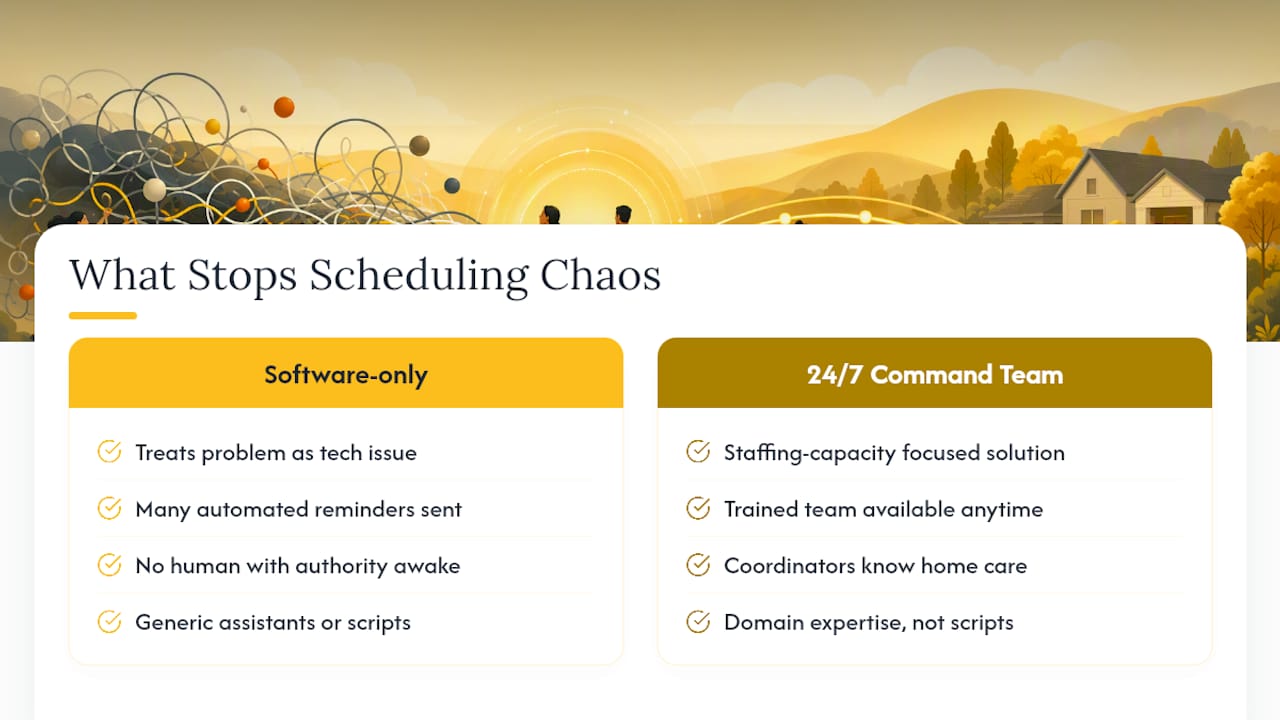
A scheduling app can send a hundred reminders and still leave a gap unfilled at 2 a.m. because no human being with the authority to act is awake to see the alert. That’s the piece most agencies underbuild. A 24/7 command center model prevents callout cascades precisely because it puts a trained team, not a single on-call manager running on four hours of sleep, on the problem the moment it appears.
The teams that actually change outcomes aren’t generic virtual assistants. They’re coordinators who already understand home care compliance, care plans, and the specific panic in a family’s voice when a caregiver hasn’t arrived. That domain knowledge is what turns a filled shift into a documented, defensible, calm resolution instead of a scramble that gets logged nowhere. Outsourcing coordination roles works when the people doing it already speak the language of the industry, not when it’s a generic call center reading from a script.
— Ian Dwight Abejo
How The BOSS System Ends the 2 A.M. Scramble
A trained team replaces the solo on-call manager to handle caregiver call-offs at any hour: shifts get filled from a backup pool, families receive calm, informed communication, and all calls are documented. Owners are only woken for true emergencies.
Beyond after-hours coverage, dedicated teams can handle scheduling and staffing coordination, recruiting, credentialing, and billing, staffed by people trained in home care workflows rather than generalist virtual assistants. A trained coordinator through The BOSS System costs roughly 70% less than the same hire in-house, once you count payroll taxes, benefits, and equipment.
If your agency loses more hours to scheduling fires than to actual client visits, start by mapping which shifts you handle in-house versus which need dedicated after-hours backup. Then talk to the Command Center team about scope and coverage hours that match your call volume.
Where These Recommendations Come From
The scheduling patterns and cost figures cited above come from GrowCare Team’s analysis of caregiver no-shows, Aveecare’s scheduling best-practices guide, and reporting on fragmented home health workflows. Benchmark your own no-show and fill-rate numbers against these sources before deciding what to fix first.
Sources
Recommended


Comments