


Credentialing Checklist for Healthcare Administrators


Start by building a master provider file with these core documents: government-issued photo ID, current state license, NPI number, DEA registration if the role prescribes controlled substances, malpractice certificate of insurance, a gap-free CV, immunization records, and a cleared background check. Once those are gathered, the single next action is to create a centralized digital file and begin your CAQH ProView attestation and PECOS enrollment in parallel, since payers and Medicare both draw from those systems independently.
Government-issued photo ID
State license (verified through the state board portal)
NPI number (confirmed in NPPES)
DEA registration, if applicable
Malpractice certificate of insurance
CV with no unexplained employment gaps
Immunization records
Background check results
Store everything in one master file, physical or digital, organized by provider rather than scattered across departments. Standard professional credentialing runs 45 to 90 days from submission; caregiver onboarding can move in about a week when the paperwork above is already assembled and clean.
Key Takeaways
A complete credentialing checklist combines universal documents, role-specific certifications, and disciplined primary source verification, and it works fastest when one person owns the file from start to finish.
Point | Details |
Start with the master file | Collect ID, license, NPI, DEA if applicable, malpractice COI, CV, immunizations, and background checks first. |
Separate by role | Physicians, APPs, nurses, and caregivers each need different specialty documents beyond the core set. |
Expect 45 to 90 days | Standard professional credentialing takes several weeks; caregiver onboarding can drop to about a week when prepared. |
Fix delays before submission | QA every date, verify NPI in NPPES, and reconcile the CV before sending the application. |
Delegate to specialized staff | Boss provides trained credentialing specialists who manage CAQH, PSV, and file tracking at lower overhead than an in-house hire. |
This article is general information, not a substitute for advice from a qualified lawyer. Consult a qualified legal professional about your own circumstances before acting on anything here.
Table of Contents
Building a Credentialing Checklist by Provider Role
A credentialing checklist isn’t one document. It’s a family of them, and the file for a physician looks nothing like the file for a home health aide. Every role shares a core set of documents, but the specialty items are where most administrators get tripped up, usually by assuming one template covers everyone on staff.
Universal documents every provider type needs:
Government-issued photo ID and Social Security verification
Completed I-9 employment eligibility form
Current CV or employment history with no unexplained gaps
Proof of malpractice or liability insurance
Up-to-date immunization records
Cleared federal and state background checks
From there, the checklist branches by role.
Physicians and advanced practice providers (APPs) need the heaviest file: active state medical license, NPI documentation, DEA registration for any controlled-substance authority, board certification, residency or fellowship completion letters, and a PECOS enrollment record for Medicare billing. For NPDB-reportable provider types, an NPDB query is mandatory before the file is considered complete.
RNs and LPNs need current state nursing licensure, specialty certifications (ACLS, PALS, or similar depending on unit), and employer verification letters covering the last several years of practice.
CNAs and home health aides carry a different, lighter but still non-negotiable stack: state nurse aide registry confirmation, a current TB test (typically within the last 12 months), CPR/BLS certification, and documentation from any state-approved training program. Home care agencies frequently underestimate how often these expire mid-employment, which becomes a compliance problem during a state survey.

Behavioral health specialists add license verification through their specific board (psychology, counseling, or social work licensing boards vary by state), plus any supervised-hours documentation required for independent practice status.
Dental providers need state dental board licensure, DEA registration if they prescribe, and malpractice coverage specific to dental procedures, which some general liability carriers exclude.
Locum tenens and temporary staff are the trickiest category. You still need the full core file, but timelines force compromises. Many organizations use provisional privileging based on verified license status and a clean NPDB query, while slower items like education verification catch up in the background. The key is documenting exactly what’s provisional and setting a hard deadline to close the gap, not letting “temporary” quietly become permanent.
How Does the Credentialing Process Actually Work?
Credentialing moves through five predictable stages, and skipping the order almost always costs time later. MedCBO’s enrollment framework breaks it into document preparation, application submission, primary source verification, committee review, and payer enrollment or contracting.
Document preparation. Gather every item from your role-specific checklist before submitting anything. Incomplete files get bounced back, and each round-trip adds days.
CAQH ProView setup. Build or update the provider’s centralized profile. Most commercial payers pull directly from this profile, so errors here ripple across every payer contract.
Application submission. Submit to each target payer and, for Medicare, through PECOS.
Primary source verification (PSV). Licenses, education, and board certifications get confirmed directly with the issuing body, not from copies the provider hands you.
Committee review and payer enrollment. A credentialing committee approves the file, then payer enrollment and contracting finalize network participation.
Here’s roughly what to expect at each stage:
Stage | Typical duration |
Document preparation | 1 to 2 weeks |
CAQH profile completion | 3 to 5 business days |
Primary source verification | 2 to 4 weeks |
Committee review | 1 to 3 weeks |
Full cycle, professional credentialing | 45 to 90 days |
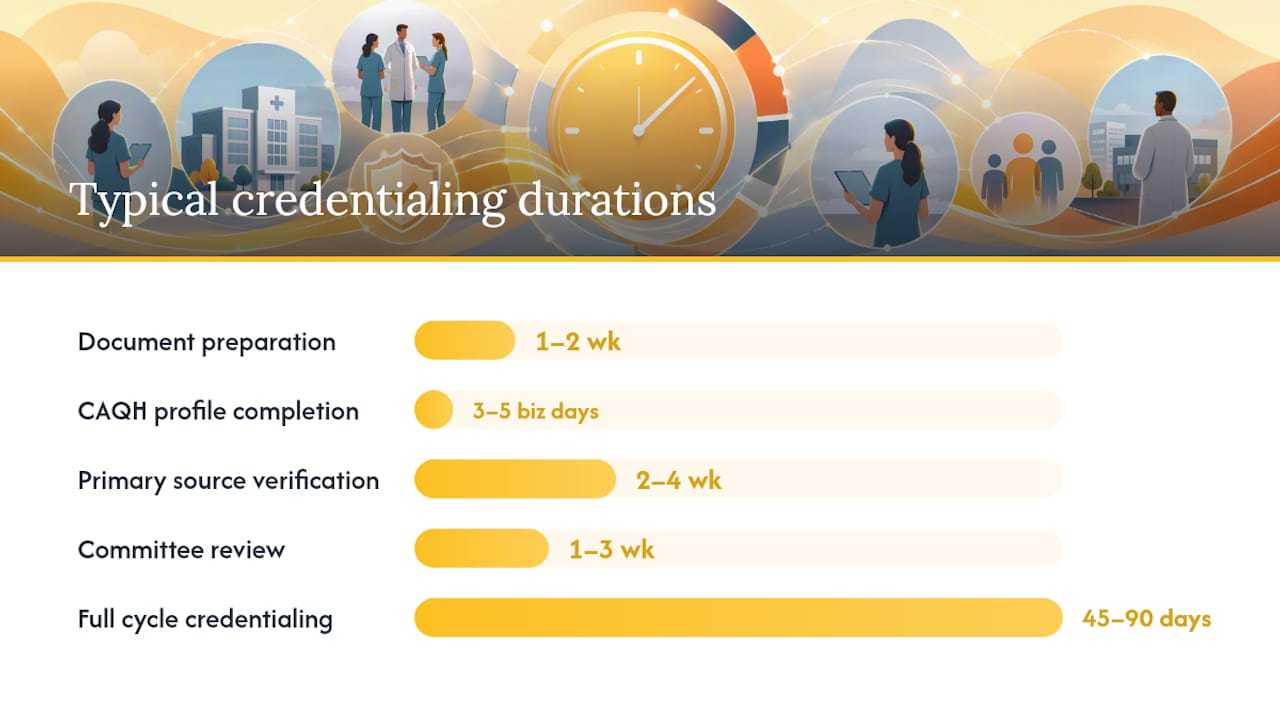
Unmanaged files with attestation errors or missing PSV documentation regularly stretch past 60 to 120 days. Set internal checkpoints: start PSV the same day you submit, follow up with verifiers every five business days, and escalate to a supervisor if any single item stalls past two weeks.
What Do Credentialing Documents Actually Verify?
Each document on a checklist exists to answer one specific question, and knowing that question makes verification faster. A government-issued photo ID confirms identity. An I-9 confirms legal work eligibility. Neither requires anything beyond a visual check against the original.
State license verification is where administrators need to go to the source, not trust a scanned copy. Every state medical, nursing, and allied health board maintains a public lookup portal, and that portal is the only acceptable primary source for license status, not the license PDF itself.
NPI documentation gets confirmed through NPPES, the CMS registry that assigns and displays every National Provider Identifier. DEA registration, when applicable, is checked directly against the DEA’s registration database, since a lapsed or restricted DEA number is one of the most common reasons a payer rejects an otherwise complete file.
Board certification requires contacting the certifying board directly, and NPDB queries confirm whether any malpractice payments or adverse actions exist on record. HRSA’s site-visit protocol treats NPDB continuous query enrollment as best practice for reportable provider types, meaning the file gets flagged automatically if something changes after hire, not just at initial credentialing.
Malpractice certificates of insurance should come directly from the insurer, listing coverage dates, limits, and any claims history, never a summary written by the provider.
Pro Tip: Build one master CV template that every new hire fills out with exact month/year dates for every position, license, and gap. A single unexplained three-month gap is one of the most common reasons committees send a file back for clarification.
Privileging vs. Credentialing: What’s the Difference?
Credentialing verifies that someone is who they say they are and holds the qualifications they claim. Privileging is a separate decision: what specific procedures or scope of practice this person is allowed to perform at this organization.
A physician can be fully credentialed and still lack privileges for a specific procedure until additional evidence is reviewed. Privileging files typically require:
Procedure-specific case logs showing recent volume and outcomes
Letters of reference from supervising or peer physicians
Proctoring records for new or high-risk procedures
Current competence attestations tied to the specific privilege requested
Privileging documents live in the same provider file as credentialing records but get reviewed on a separate track, often by a clinical committee rather than an administrative one. Both cycles typically renew every two years, and lining up the renewal dates saves a second round of paperwork later.
Why Do Credentialing Files Get Delayed?
Most delays trace back to a handful of repeat offenders, and nearly all of them are preventable with a five-minute quality check before submission.
Expired licenses or certifications that lapsed between application and review
Date mismatches between the CV, employment verification, and license records
Unexplained gaps in employment history
Incorrect NPI or taxonomy codes entered on the application
Incomplete or outdated CAQH attestations
Missing or delayed primary source verification requests
The fix for most of these is a QA pass before anything gets submitted: cross-check every date, confirm the NPI and taxonomy code directly in NPPES, and reconcile the CV against every license and employer on file. Set automated expiration reminders so a lapsed certification never gets discovered mid-review.
Pro Tip: If a payer’s review stalls past two weeks with no update, call the credentialing department directly rather than emailing. Ask specifically what document, if any, is missing, and attach it the same day.
What Timelines Should Home Care Agencies Expect?
Timeline data backs up what most administrators already suspect: the gap between a well-managed file and a neglected one is enormous. Professional credentialing through payer networks runs 45 to 90 days when the file is clean at submission. Caregiver onboarding, by contrast, can be compressed to roughly a week when documentation is standardized ahead of time.
Approach | Typical time to enrollment |
No dedicated credentialing support | 60 to 120+ days |
Standard managed process | 45 to 90 days |
Optimized caregiver onboarding | About a week |
Getting to that faster end of the range usually means assigning clear ownership: a credentialing coordinator who owns document collection, a dedicated agent who initiates PSV requests the day an application goes in, someone who keeps the CAQH profile current, and an escalation owner who steps in the moment a file stalls. Agencies that delegate these functions to trained staff or outsourced coordinators tend to close files faster simply because no single person is juggling credentialing alongside five other job functions.
How Should You File and Track Credentialing Records?
A credentialing checklist is only useful if the resulting files stay organized long after the initial approval. Set up one folder per provider, named consistently (last name, role, hire date), with subfolders for licenses, certifications, PSV confirmations, and privileging documents.
Track metadata for every credential: expiration date, issuing body, verifier name, and date of verification. That metadata is what separates an audit-ready file from a pile of scanned PDFs.
Reminder trigger | Action |
60 days before expiration | Send renewal notice to provider |
At least one month before expiration | Confirm renewal in progress |
About a week before expiration | Escalate if not yet resolved |
Home care checklists consistently recommend monthly audits alongside these automated reminders, since a single missed renewal can trigger a denied claim or a failed state survey. Keep verified primary-source confirmations separate from provider-submitted copies. HRSA and Joint Commission reviewers want to see the verification record, not just the document itself.
What Home Care Agencies Get Wrong About Credentialing
Turnover is the variable most credentialing guides underestimate. A hospital system credentials a physician once every two years. A home care agency might onboard a new caregiver every few weeks, each with a different license state, a different training background, and a different set of expiring certifications.
The shortcuts that actually hold up under pressure aren’t complicated: a single master CV template every hire fills out identically, provisional checks for anyone who clears the fastest verifiers first, and a CAQH profile that’s pre-filled before the provider even asks about it. None of that requires new software. It requires someone whose job is specifically to own the file, not a scheduler doing it between phone calls.
Agencies that treat credentialing as a side task, rather than a dedicated role, are the ones who end up with expired TB tests three weeks into a new hire’s first assignment.
Let Boss Handle Your Credentialing Overhead
Boss is the alternative to hiring a full-time in-house credentialing coordinator: a trained specialist handles document collection, CAQH upkeep, and PSV follow-up for a fraction of the cost of an in-house hire, with no payroll taxes, no benefits, and no equipment to provision.
The Command Center Pod and dedicated virtual assistants at Boss are trained specifically in home care workflows, which means your credentialing specialist already knows what a state nurse aide registry check looks like and why a TB test date matters. Instead of a scheduler squeezing credentialing into a spare hour between phone calls, you get someone whose job is exclusively tracking expirations, chasing verifications, and keeping every provider file audit-ready. That translates directly into fewer denied claims and faster time-to-enrollment for new hires.
If your agency is losing hours every week to expired certifications and stalled payer applications, explore Boss’s workforce solutions and see how a dedicated credentialing specialist fits into your operation.
Sources
Recommended


Comments